.svg)
.webp)


For Shopify, proof of delivery means matching the recipient, handover time, photographs, and signature to fulfillment orders and fulfillments. The SuiteFleet connection retains fulfillment-order line items so the team can reconcile accepted quantities and exceptions. Capturing proof and successfully updating the source record are separate checks.
Connector availability: SuiteFleet plans to publish its Shopify connector on Shopify App Store, subject to the marketplace review and release process.
1. Start with the Shopify order
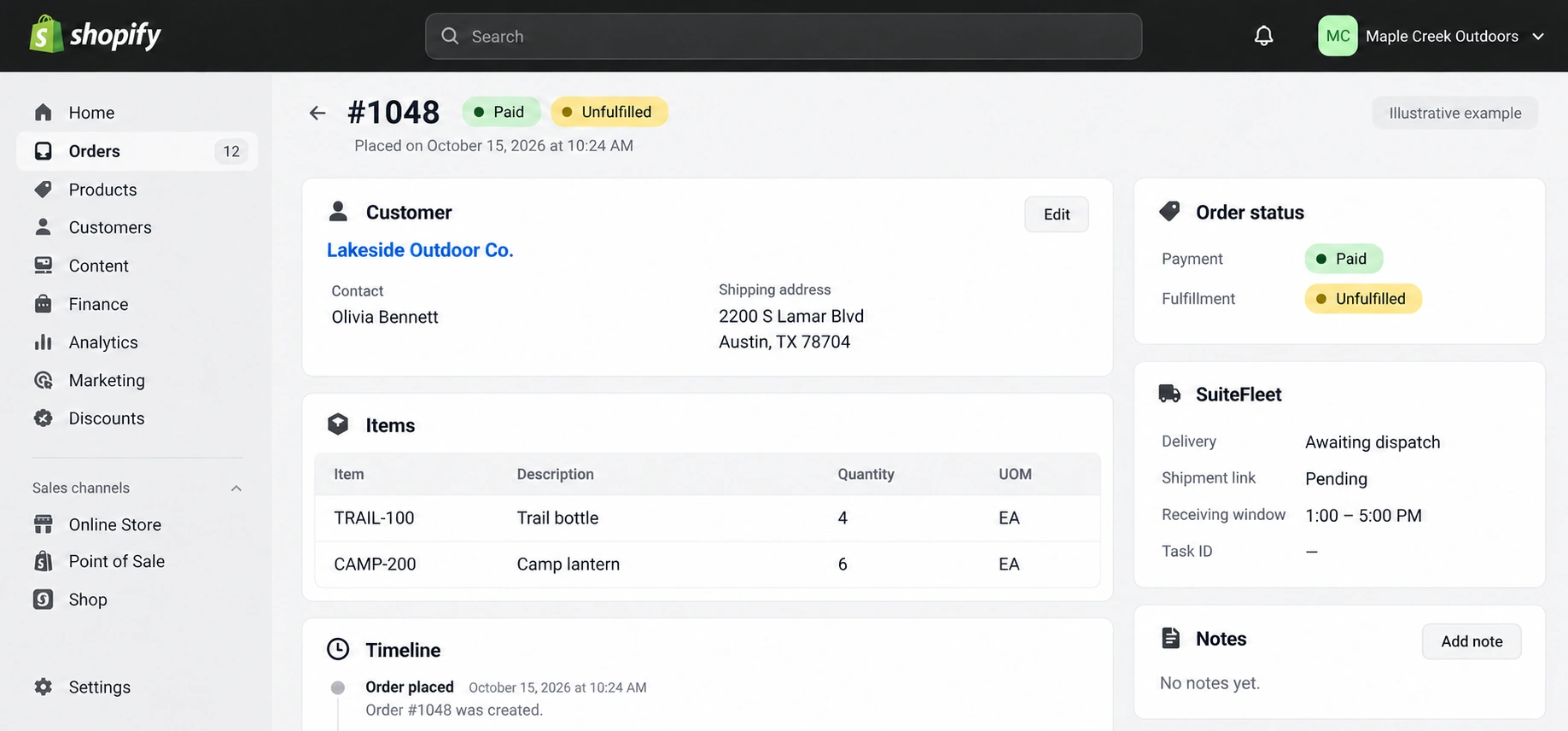
Open the source order #1048 for Lakeside Outdoor Co. and inspect its delivery destination, line quantities, and configured SuiteFleet relationship. The example contains two lines with quantities 4 and 6 in the units shown.
Select an open order with eligible unfulfilled physical items. Check payment or credit policy, fraud review, fulfillment holds, and assigned location before release. Do not dispatch a held, canceled, or not-yet-due scheduled fulfillment order.
Shopify can split one order into several fulfillment orders and locations. Preserve the fulfillment-order line IDs and explicit quantities when creating a fulfillment. Moving work between locations or splitting it after export changes the assignment; the connector must reconcile that change before dispatch. Shopify order statuses.
2. Configure the evidence mapping
Preserve this relationship before exporting delivery work:
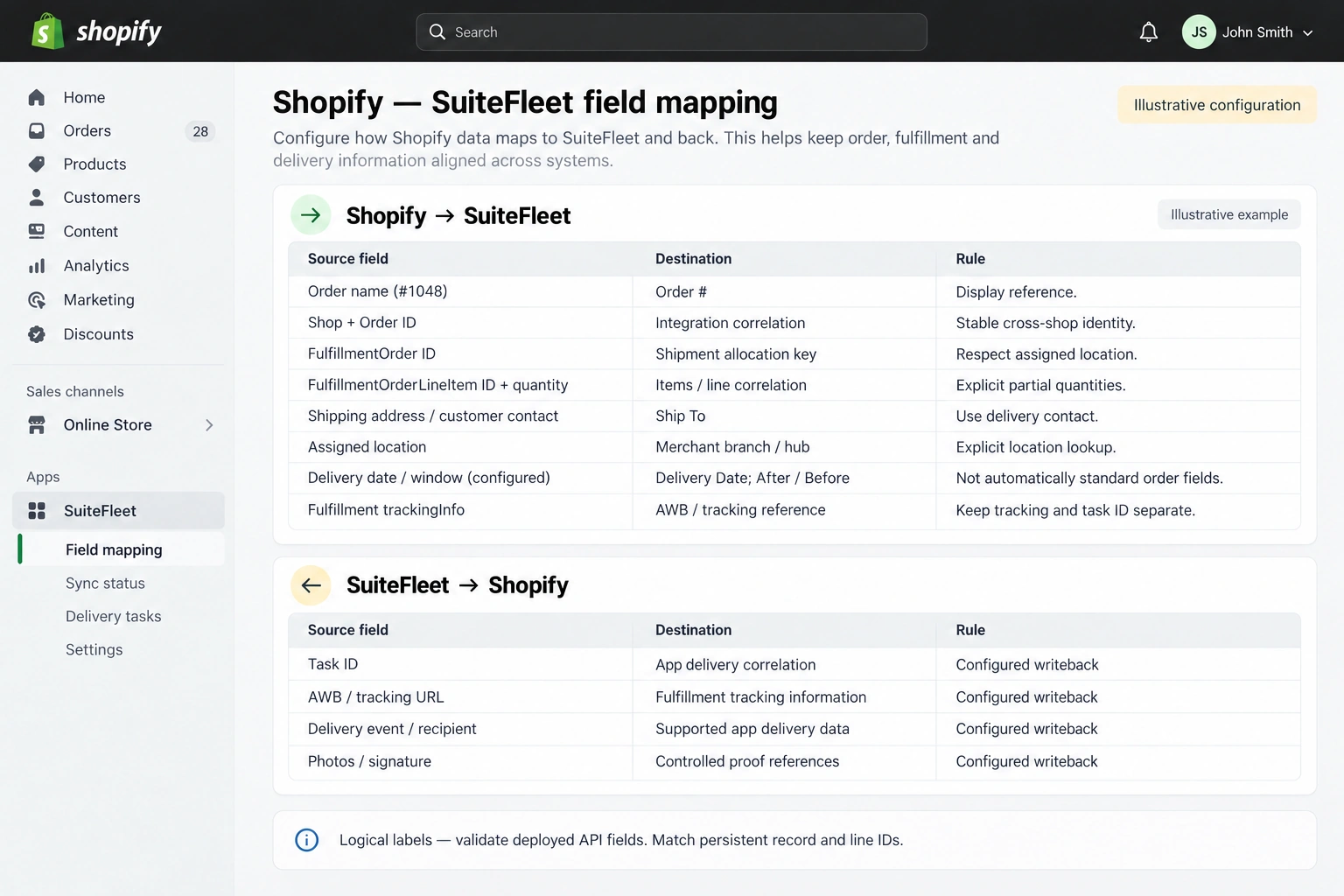
| Shopify source | SuiteFleet destination | Rule |
|---|---|---|
| Order name (#1048) | Order # | Display reference. |
| Shop + Order ID | Integration correlation | Stable cross-shop identity. |
| FulfillmentOrder ID | Shipment allocation key | Respect assigned location. |
| FulfillmentOrderLineItem ID + quantity | Items / line correlation | Explicit partial quantities. |
| Shipping address / customer contact | Ship To | Use delivery contact. |
| Fulfillment trackingInfo | AWB / tracking reference | Keep tracking and task ID separate. |
| SuiteFleet result | Shopify destination | Writeback rule |
|---|---|---|
| Task ID | App delivery correlation | Confirm field access during configuration. |
| AWB / tracking URL | Fulfillment tracking information | Confirm field access during configuration. |
| Delivery event / recipient | Supported app delivery data | Confirm field access during configuration. |
| Photos / signature | Controlled proof references | Confirm field access during configuration. |
Keep the planned shipping contact separate from the actual recipient. A tracking event, signature, or photo must resolve to the correct fulfillment ID, not just the visible order number.
3. Define and check the evidence requirements
Agree the evidence policy before dispatch: which shipments need a recipient name, photographs, signature, and completion information, and who reviews missing evidence. Only require capture methods verified in the deployed driver workflow. Confirm that the connector can retrieve each required evidence field.
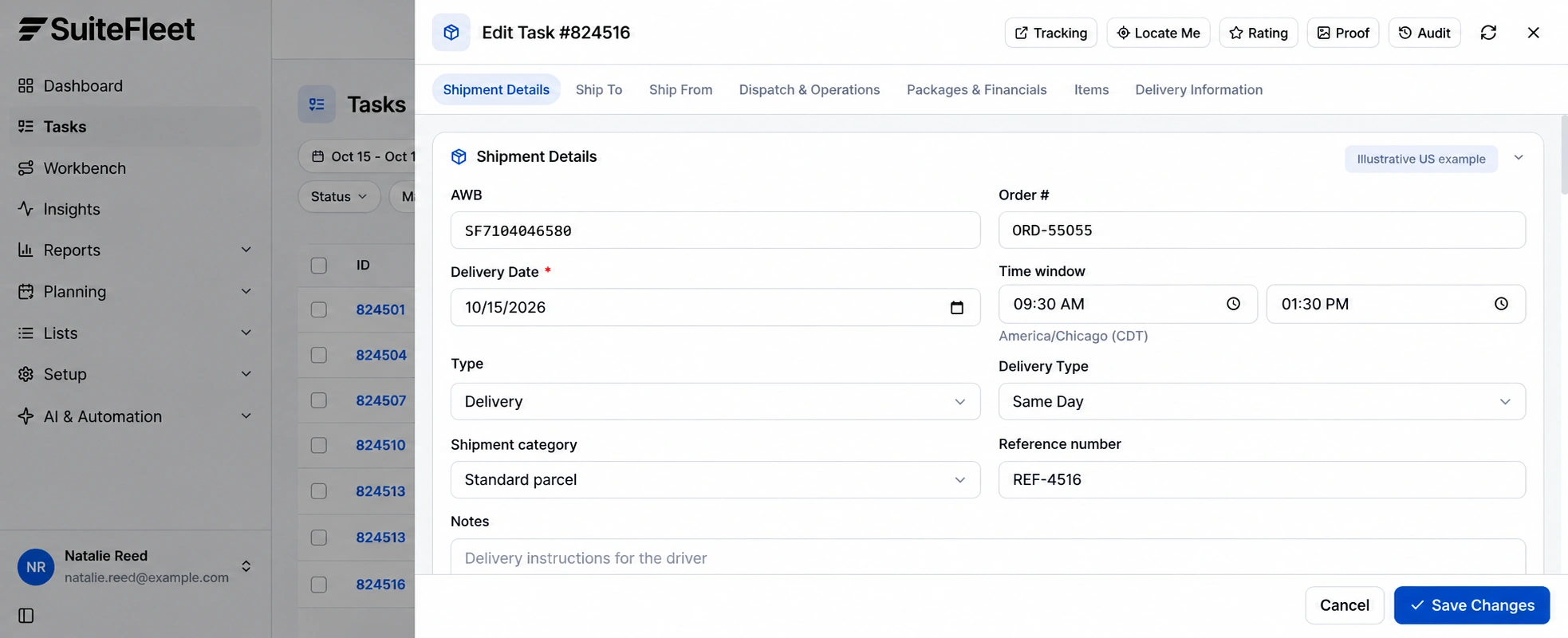
Before opening proof, match the task to Fulfillment F-1048-1 through the correlation record. Names, addresses, and order display numbers alone are insufficient when the customer receives repeat or split shipments.
Distinguish the expected consignee from the person who actually accepted the goods. Validate file access and retention requirements with the deployment owner so a saved link remains useful to the intended support team.
4. Review proof of customer handover
Open Proof from the task or Reports → POD Analysis → Full proof. Review delivery photos, signature, recipient, and recorded completion together. Review Proof of pickup and Proof of delivery separately. Confirm customer receipt from the delivery record.
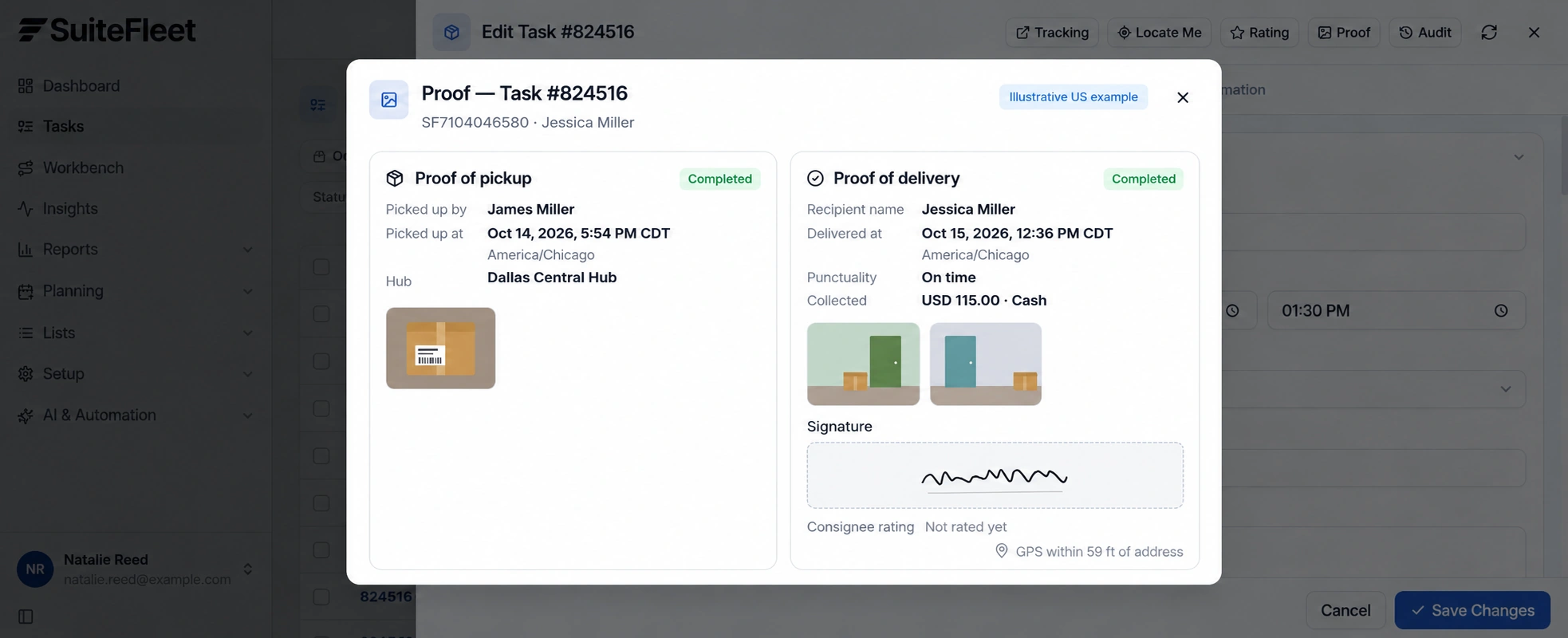
Do not infer received item quantities from a photograph, a signature, or the package count. Store the event time with its time zone. This example uses America/Chicago (CDT).
One fulfilled shipment must not hide another unfulfilled group in the same order. If only 4 of 10 units are released, keep the other 6 outstanding and retain a separate task and fulfillment relationship for the later shipment.
If there is a shortage, refusal, or disputed recipient, preserve the original evidence and record the exception. Retain the source shipment and line keys during review; do not create a new shipment simply because proof needs correction.
5. Store controlled evidence references
Shopify documents the GraphQL Admin API fulfillmentCreate operation and trackingInfo. Specify the selected fulfillment-order line items and quantities; omitting the line list can fulfill all remaining items. Fulfillment-order scopes and assigned-location permissions must match the app’s role. Shopify fulfillment solutions.
Write recipient, event time, outcome, and evidence references only to validated destinations. Check whether the interface stores a file, an attachment relationship, or an external URL. Apply access controls to the evidence location; a link in a transaction does not itself grant appropriate access.
Handle status and attachment updates independently. If the status sync succeeds but a photo reference fails, retain the partial integration error and retry that operation safely. Verify the target record after retry before reporting a clean sync.
6. Verify the result in Shopify
Reconcile the appropriate fulfillment and its tracking information. A Fulfilled order reflects shipped items, while a delivered event describes customer receipt. Store proof metadata through the supported integration and verify each fulfillment before concluding the whole order is delivered. Shopify order statuses.
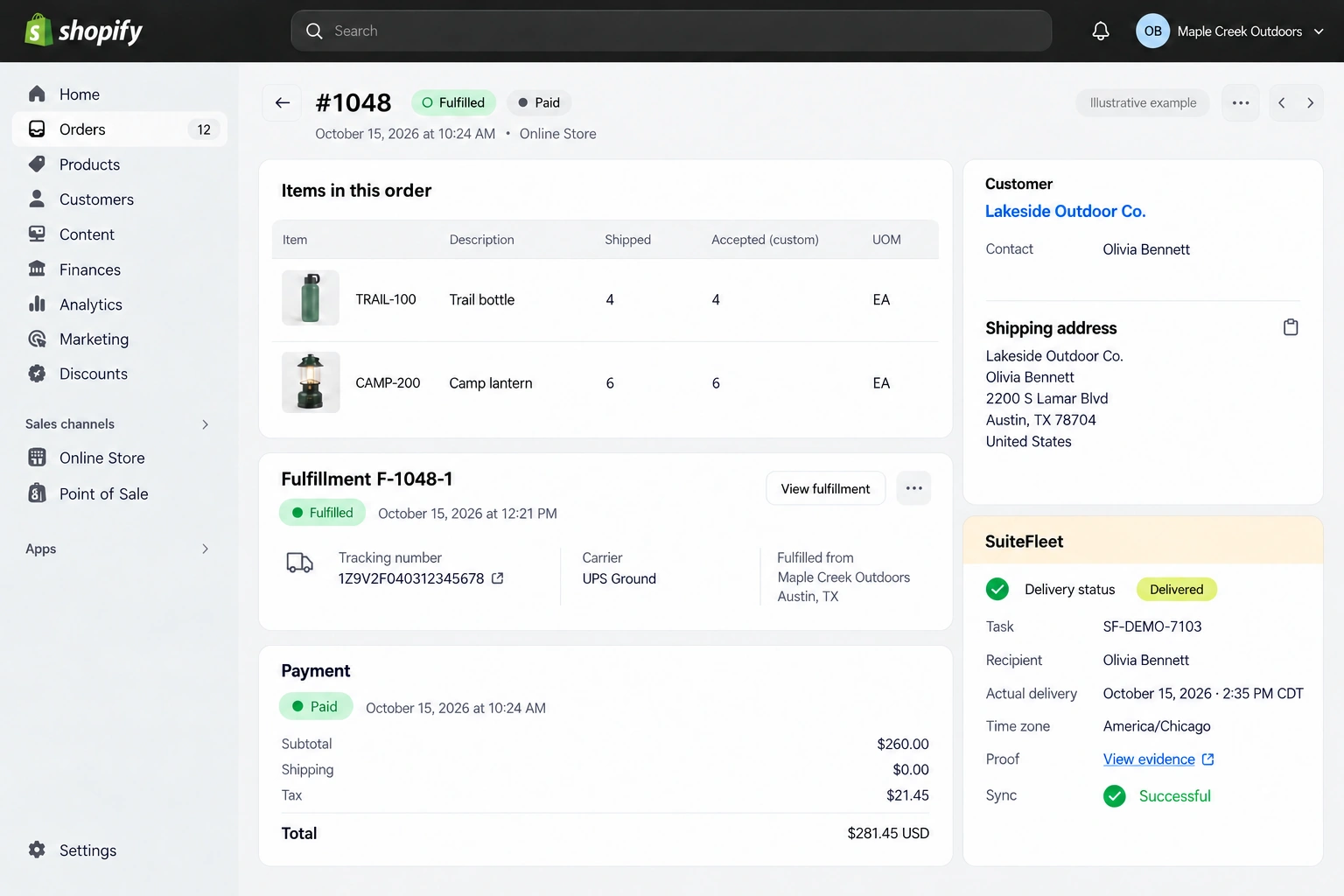
Fulfillment F-1048-1; task SF-DEMO-7103; recipient Olivia Bennett; actual handover October 15, 2026 · 2:35 PM CDT (America/Chicago). First line: 4 shipped and 4 accepted. Second line: 6 shipped and 6 accepted.
Read back the linked record and review every outstanding allocation before marking the full order delivered. Test partial shipment, partial acceptance, failed delivery, duplicate completion, and delayed writeback. Keep inventory posting, receipt evidence, and payment reconciliation under their respective configured rules.
Frequently asked questions
How should proof of delivery be matched in Shopify?
Keep the planned shipping contact separate from the actual recipient. A tracking event, signature, or photo must resolve to the correct fulfillment ID, not just the visible order number.
Does a delivered task complete the Shopify source workflow?
Reconcile the appropriate fulfillment and its tracking information. A Fulfilled order reflects shipped items, while a delivered event describes customer receipt. Store proof metadata through the supported integration and verify each fulfillment before concluding the whole order is delivered.


.png)

.jpeg)



.png)





.svg)


.svg)
.svg)
.svg)