.svg)
.webp)


The SAP S/4HANA–SuiteFleet workflow turns released work from outbound deliveries into stops with a loading point, destination, and receiving window. Dispatchers review drivers, optimization objectives, and unassigned stops before applying a route. Actual completion is reconciled afterward using delivery items and predecessor relationships.
Connector availability: SuiteFleet plans to publish its SAP S/4HANA connector on SAP Store, subject to the marketplace review and release process.
1. Start with the SAP S/4HANA order
Open the source order 50001234 for Northstar Components and inspect its delivery destination, line quantities, and configured SuiteFleet relationship. The example contains two lines with quantities 4 and 6 in the units shown.
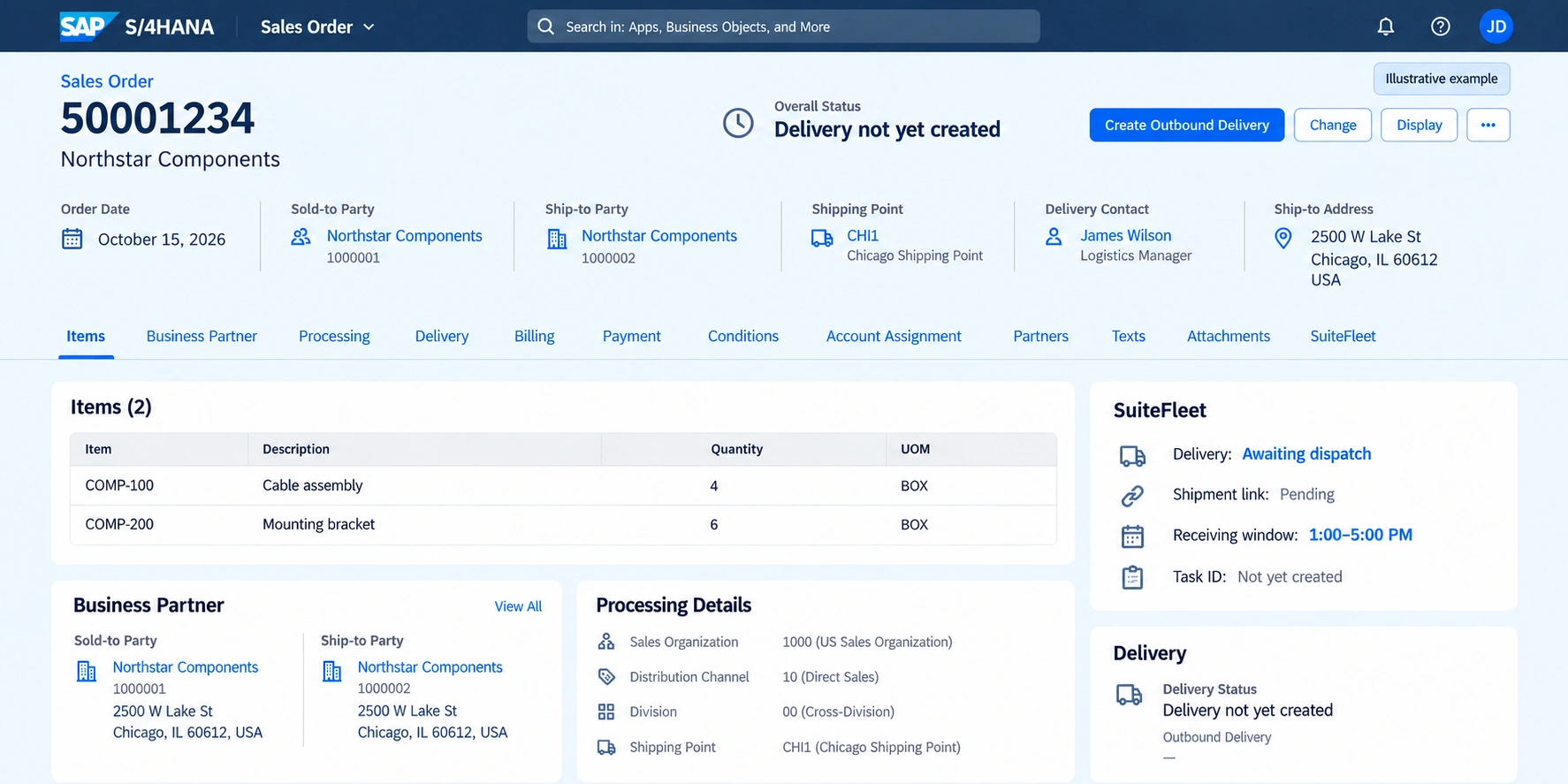
Review the sales order and delivery-relevant items, then identify the outbound delivery selected for execution. Resolve delivery or credit blocks, stock availability, picking, packing, and shipping-point requirements through the configured SAP process before dispatch.
The outbound delivery is the execution anchor, not simply the sales-order header. Shipping point, plant, ship-to party, delivery item, and sales unit matter when constructing tasks. Several source items or orders can feed the execution document; preserve all predecessor relationships. SAP delivery management APIs.
2. Configure the planning mapping
Preserve this relationship before exporting delivery work:
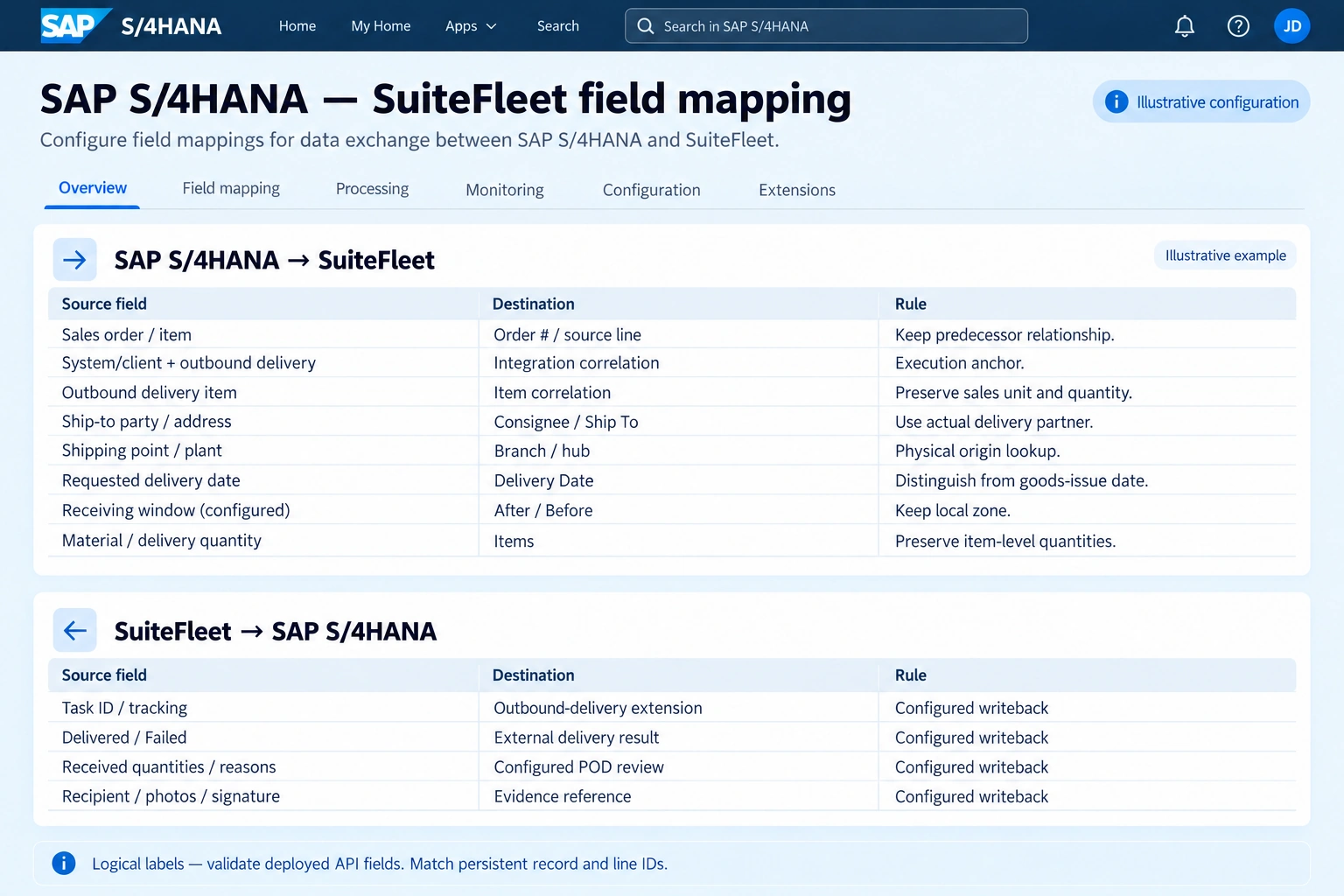
| SAP S/4HANA source | SuiteFleet destination | Rule |
|---|---|---|
| Sales order / item | Order # / source line | Keep predecessor relationship. |
| System/client + outbound delivery | Integration correlation | Execution anchor. |
| Ship-to party / address | Consignee / Ship To | Use actual delivery partner. |
| Shipping point / plant | Branch / hub | Physical origin lookup. |
| Requested delivery date | Delivery Date | Distinguish from goods-issue date. |
| Receiving window (configured) | After / Before | Keep local zone. |
| Material / delivery quantity | Items | Preserve item-level quantities. |
| SuiteFleet result | SAP S/4HANA destination | Writeback rule |
|---|---|---|
| Task ID / tracking | Outbound-delivery extension | Confirm field access during configuration. |
| Delivered / Failed | External delivery result | Confirm field access during configuration. |
| Received quantities / reasons | Configured POD review | Confirm field access during configuration. |
| Recipient / photos / signature | Evidence reference | Confirm field access during configuration. |
Map shipping point and plant to the real departure location. Keep planned goods-issue date separate from requested customer arrival, and preserve customer receiving windows and any shipping restrictions.
3. Select eligible stops and available drivers
Open Workbench for the intended date and filters. Inspect task, driver, and hub layers; resolve tasks without a location before optimization. Use geographic selection to choose the intended area, then confirm the selected task set contains only released work.
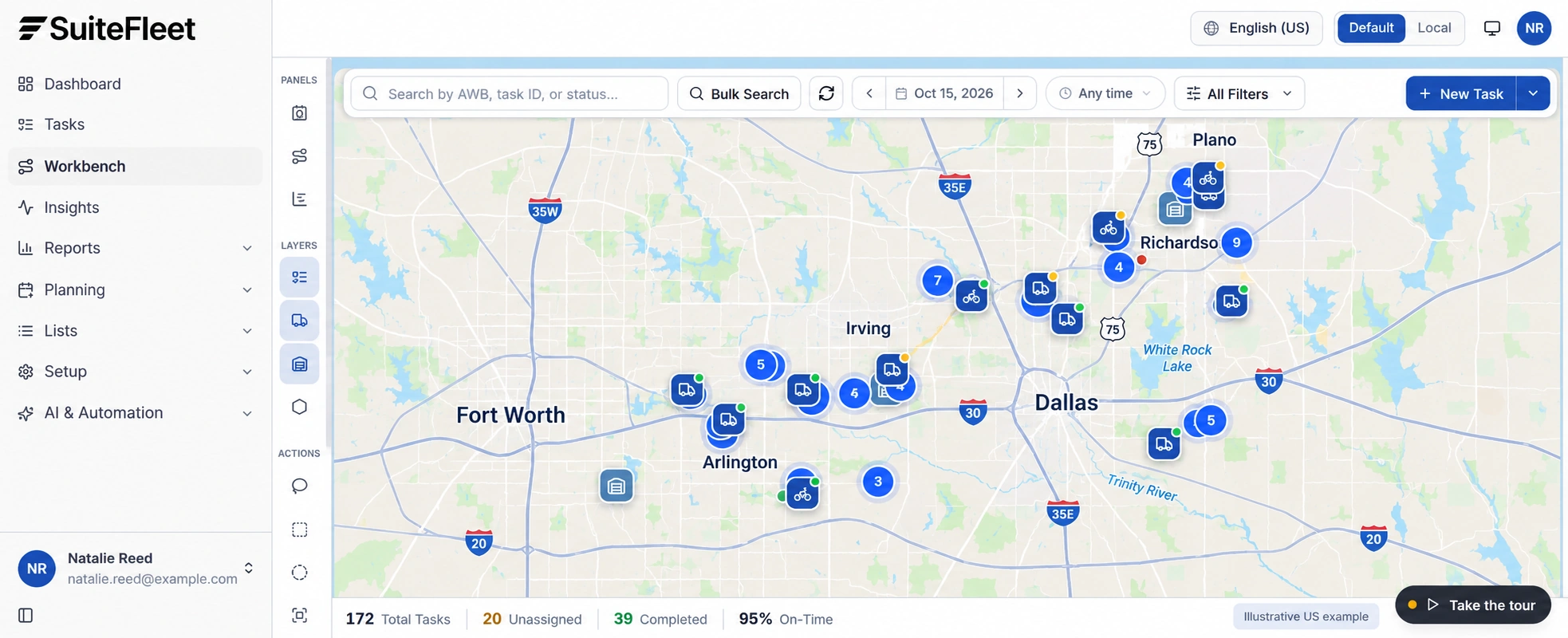
Choose Plan & Optimize when assigning eligible tasks across drivers, or Optimize Existing Routes when retaining assignments and improving stop sequence. Review enabled drivers, shift windows, departure hubs, and the displayed task-capacity limits. Do not assume those limits represent weight or volume.
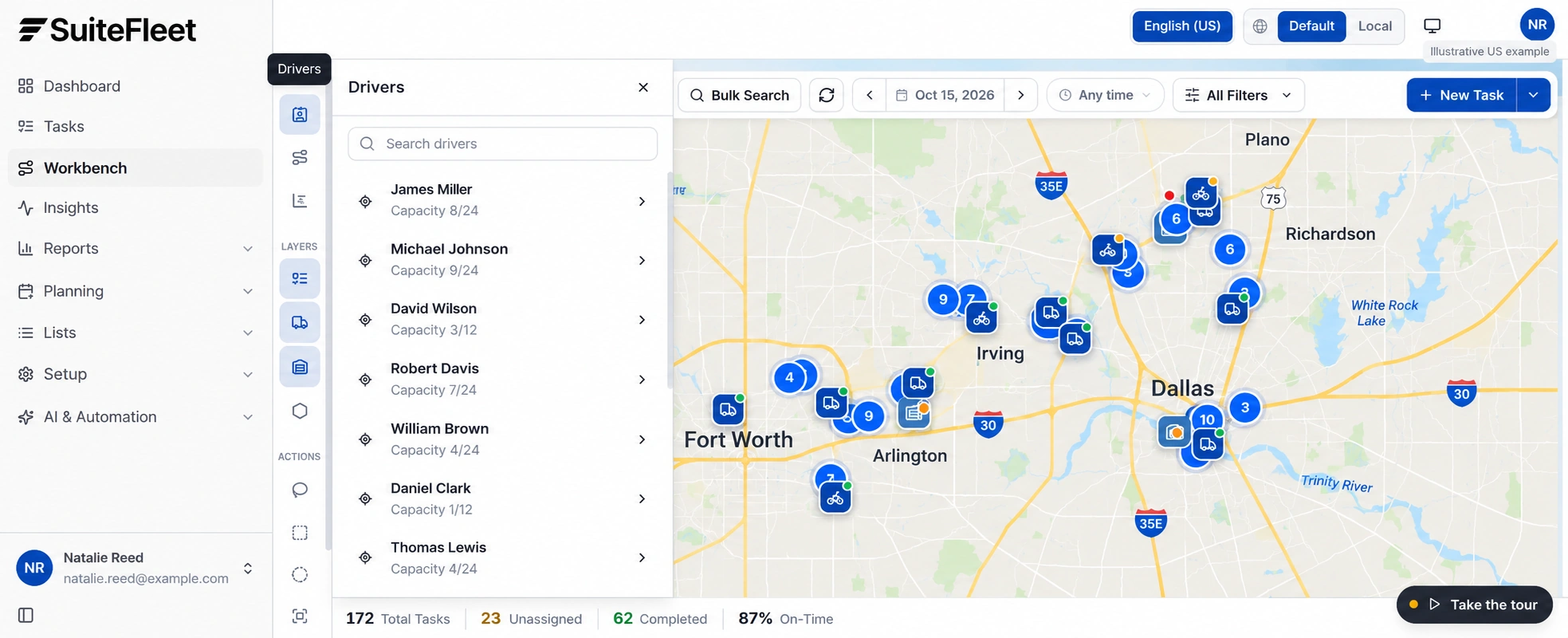
The outbound delivery is the execution anchor, not simply the sales-order header. Shipping point, plant, ship-to party, delivery item, and sales unit matter when constructing tasks. Several source items or orders can feed the execution document; preserve all predecessor relationships.
4. Review objectives, constraints, and results
Choose the supported objective: Fastest Completion, Shortest Distance, Fewest Vehicles, or Balanced Workload. Review Respect Time Windows, Reassign Assigned Tasks, and Time Per Stop before running the preview. Select the objective that matches the dispatch plan and confirm which routing constraints are enabled.
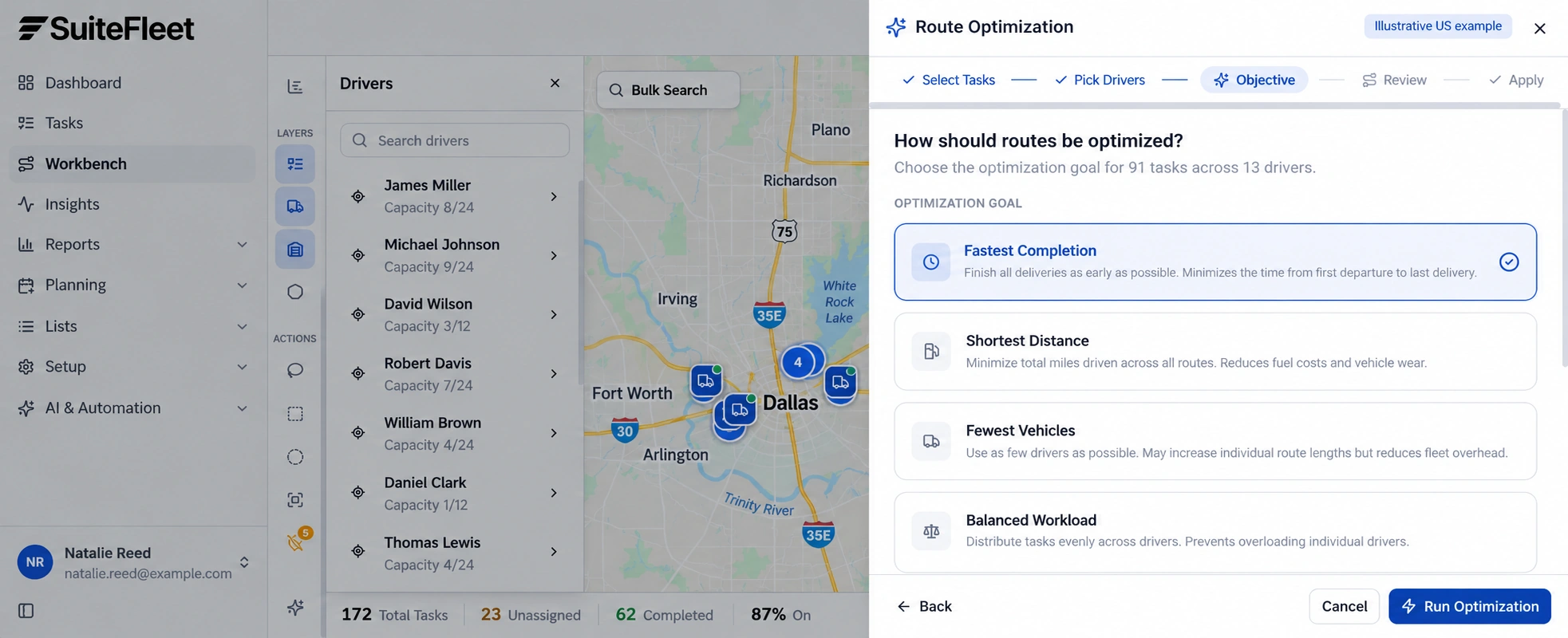
Inspect the returned driver assignments, stop sequence, projected completion, and every unassigned task. Check stop times against driver shifts as well as customer windows; confirm that the proposed schedule is feasible. Missing locations and conflicting requirements need explicit resolution.
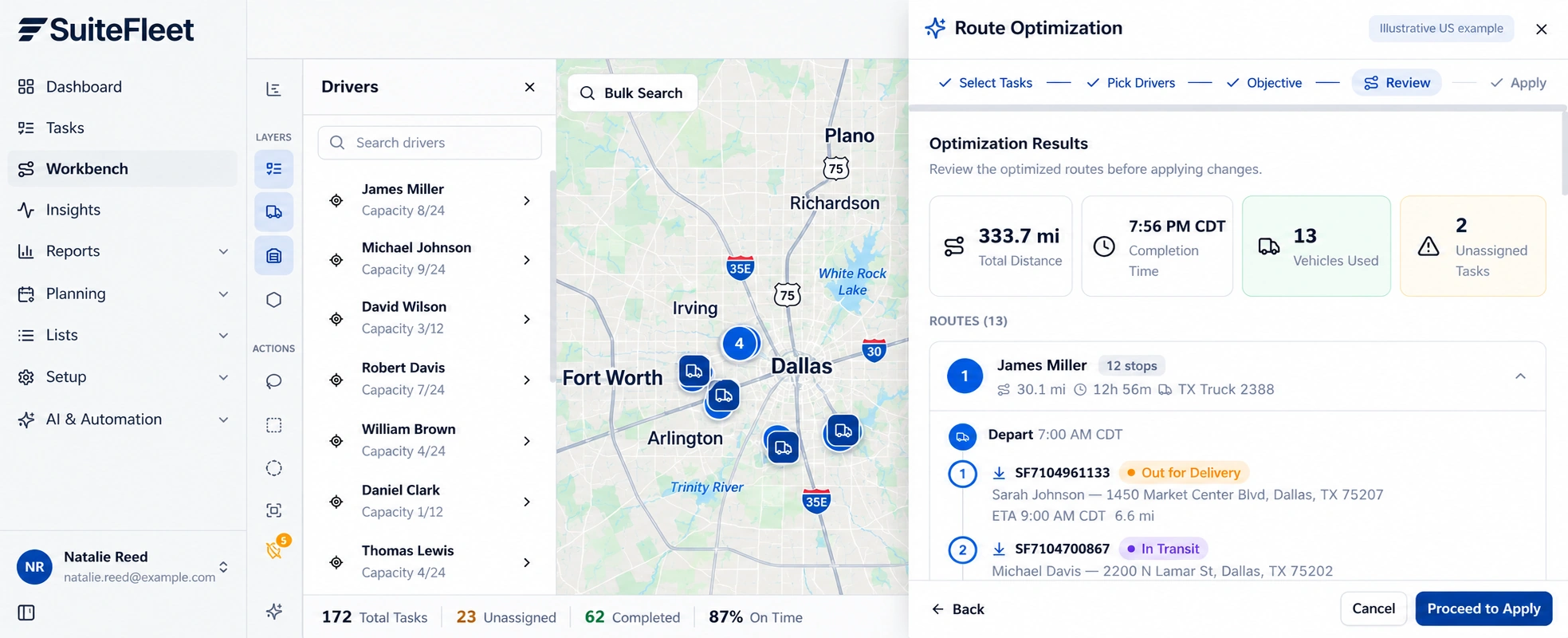
Review the Dallas–Fort Worth planning example, with distances in miles and local receiving times. Dispatchers should check stop sequence, road access, and unresolved work before applying a plan.
5. Execute the route and process actual outcomes
Keep assignment and planned arrival separate from customer delivery. Monitor failed, rescheduled, and completed stops during execution. A route application must not post inventory, close an order, or trigger billing by itself.
A shortage at handover is a receipt difference, not permission to repeat or reverse goods issue automatically. Follow the configured POD difference or exception process and keep the outbound-delivery item key.
After a stop completes, match its task ID to the source shipment, review required proof, and reconcile accepted quantities. Record actual event time and a separate sync outcome. If the source changes after planning, compare the change with the dispatched allocation before overwriting operational data.
6. Verify the result in SAP S/4HANA
Keep post goods issue separate from customer receipt. Write evidence and delivery outcome to the outbound-delivery integration extension, or use the configured SAP proof-of-delivery process where supported. Do not equate an accepted API message with a confirmed POD state. SAP delivery management APIs.
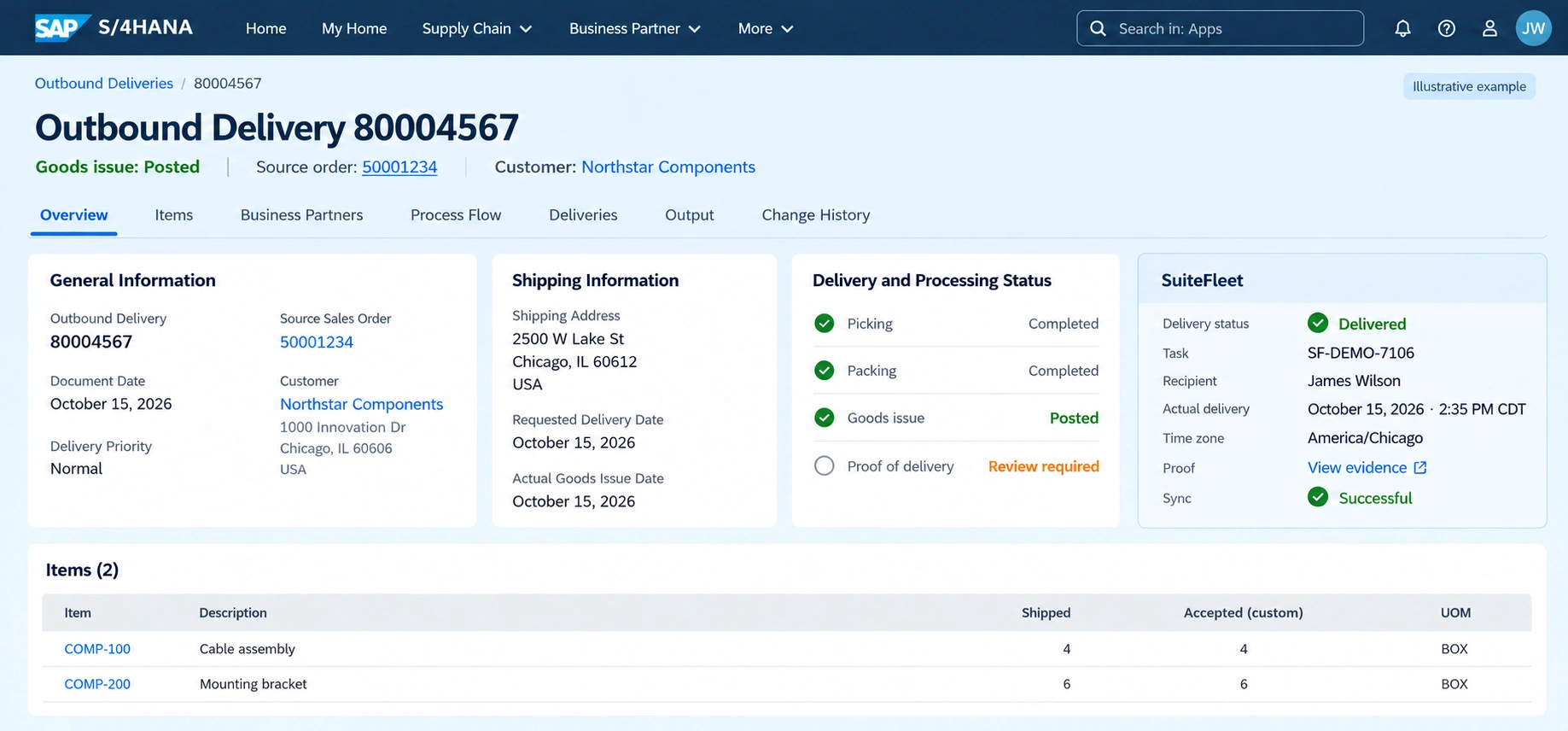
Outbound Delivery 80004567; task SF-DEMO-7106; recipient James Wilson; actual handover October 15, 2026 · 2:35 PM CDT (America/Chicago). First line: 4 shipped and 4 accepted. Second line: 6 shipped and 6 accepted.
Read back the linked record and review every outstanding allocation before marking the full order delivered. Test partial shipment, partial acceptance, failed delivery, duplicate completion, and delayed writeback. Keep inventory posting, receipt evidence, and payment reconciliation under their respective configured rules.
Frequently asked questions
Which SAP S/4HANA details are needed for route planning?
Map shipping point and plant to the real departure location. Keep planned goods-issue date separate from requested customer arrival, and preserve customer receiving windows and any shipping restrictions.
How are partial deliveries handled for SAP S/4HANA?
A shortage at handover is a receipt difference, not permission to repeat or reverse goods issue automatically. Follow the configured POD difference or exception process and keep the outbound-delivery item key.


.png)

.jpeg)


.png)

.svg)





.svg)


.svg)
.svg)