Most operations teams believe they have a delivery management system. What they actually have is three or four disconnected tools held together by manual workarounds. The gaps between those tools are where delivery costs quietly accumulate, where customer trust quietly erodes, and where the data your business depends on quietly disappears.
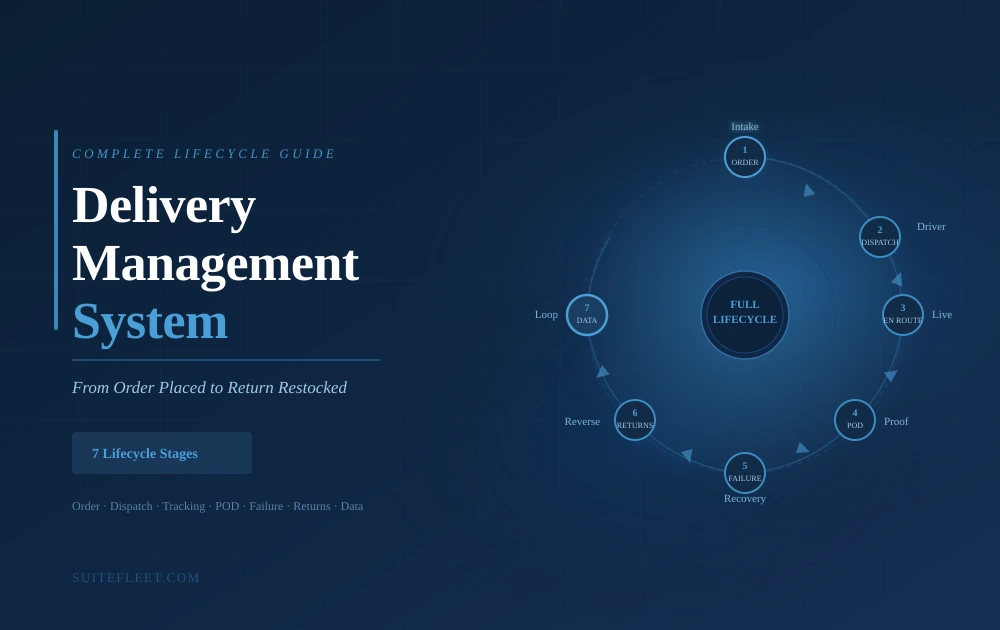
This guide walks through a delivery order from the moment it enters the delivery management system to the moment a return is restocked. At each stage, it shows what a delivery management system should do, what breaks when that capability is absent, and why the last mile only performs reliably when every stage connects back to a single source of truth.

Stage 1: The Order Enters the System
A delivery does not begin when a driver picks up a parcel. It begins the moment an order is created. The quality of every decision made from that point forward depends on the data captured at intake.
A delivery management system receives order data from wherever orders originate: your ERP, your e-commerce platform, your warehouse management system, or a customer-facing portal. What it does with that data at intake determines whether the rest of the lifecycle runs smoothly.
At minimum, the system should validate addresses against geocoding databases, flag incomplete consignee details, confirm delivery time windows against driver availability, and structure the order for load planning. When intake is handled manually, or when the DMS pulls incomplete data from a disconnected source, the error does not surface immediately. It surfaces on the road, when a driver arrives at an unverifiable address, or reaches a customer who was never notified.
The cost: Address validation failures and incomplete consignee data are two of the most common causes of failed first-attempt deliveries. Each failed attempt costs between 1.5 and 3 times the cost of a successful one.
Stage 2: Dispatch and Driver Assignment
Once an order is ready for execution, the delivery management system must answer a question that looks simple but rarely is: which driver should handle this delivery, and when?
The dispatch and driver assignment layer evaluates multiple variables simultaneously: driver proximity to the pickup point, available vehicle capacity, delivery time windows, driver shift hours, and historical performance metrics. Manual dispatch cannot optimize across all of those variables at scale. Experienced dispatchers can make good intuitive decisions for small fleets, but the margin for error increases sharply as order volumes and route complexity grow.
The assignment decision also affects the customer. A delivery management system that can send an accurate, dynamic ETA at the moment of assignment gives the customer time to prepare for the delivery. That single notification, sent automatically from the dispatch layer, reduces failed delivery attempts more reliably than almost any other intervention.
Driver app quality sits inside this stage. The app is the interface between the dispatch system and the driver. It should surface job details, navigation, time windows, and special instructions without requiring the driver to make calls to the dispatcher. Two-way communication within the app, rather than via personal phone, keeps delivery conversations structured and auditable.
Stage 3: On the Road
Once a driver is moving, the delivery management system shifts into a monitoring and adjustment role. Real-time GPS tracking provides the dispatcher with a live view of every vehicle. But tracking position alone is not the point. The point is what the system does with that information.
Modern delivery management systems use live traffic data to recalculate routes and update ETAs dynamically throughout the day. When a driver falls behind schedule, the system should flag the at-risk delivery, notify the customer of the revised window, and give the dispatcher options: reroute the driver, reassign the stop to another driver, or escalate for manual decision.
Customer communication in this stage makes a measurable difference to satisfaction scores. A customer who receives an accurate ETA update when a driver is running late rates the delivery experience significantly higher than a customer who receives nothing and simply waits. That update requires no human intervention when the system is configured correctly.
This stage is also where driver performance data accumulates. Idle time, dwell time at stops, deviation from planned route, and speed compliance are all captured here. That data has value beyond the individual trip: it feeds performance review, route planning, and fleet efficiency analysis downstream.
Stage 4: Proof of Delivery and the ERP Data Loop
A delivery is not complete when the driver hands over the package. It is complete when verified proof of that handover exists in the record systems that downstream workflows depend on.
Proof of delivery (POD) capture has become standard: most delivery apps collect a customer signature, a photo of the delivered item, and a geo-stamped timestamp. The question is not whether POD is captured. The question is where it goes.
In a fragmented stack, POD lives in the delivery tool. The finance team cannot access it to trigger an invoice. The customer service team cannot access it to resolve a dispute. The ERP does not know the delivery happened. Each of those gaps creates manual work: someone exports a report, finds the POD record, attaches it to an email, and forwards it to the team that needs it.
When the delivery management system connects directly to the ERP, POD data writes back to the order record automatically. The delivery status updates. The invoice trigger fires. The inventory position adjusts. The entire downstream workflow runs without a human having to move data between systems.
The data loop: A delivery management system that does not close the loop to the ERP is not managing delivery. It is managing the execution layer only. The business impact of that gap compounds with every order.
Stage 5: When the Delivery Fails
No delivery operation achieves a hundred percent first-attempt success rate. Failed attempts are a cost center in every fleet, and how a delivery management system handles them determines how large that cost center becomes.
When a driver cannot complete a delivery, the system should capture the failure reason (customer absent, address unreachable, refused delivery, damaged goods) and immediately trigger a structured response. That response should include an automatic customer notification, a rescheduling option surfaced to the customer directly, and a requeued delivery job created in the system without dispatcher intervention.
The failure reason also matters for analysis. If a particular area is generating a high proportion of customer-absent failures, that is a routing and notification problem. If a particular driver is logging more failed attempts than the fleet average, that is a training or process problem. Neither pattern is visible unless failure data is structured, captured consistently, and reportable across the fleet.
A delivery management system that treats a failed attempt as a closed event rather than a data point to act on is leaving value on the table with every failure.
Stage 6: The Return
Returns are growing faster than forward deliveries in many sectors, particularly in e-commerce and distribution. The reverse logistics problem is not just a volume problem. It is a structural one.
Most ERP systems and most warehouse tools were built for outbound flows. Goods move from origin to customer. When that flow reverses, many systems require manual workarounds: paper forms, phone calls, spreadsheets used to track return status, and stock adjustments entered by hand after a returned item has been physically received and inspected.
Reverse logistics management brings the same structure to inbound returns that the delivery management system brings to outbound deliveries. When a customer initiates a return, the system creates a return job, assigns it for collection (often scheduled alongside outbound deliveries on the same route), tracks the item in transit, and routes it to the appropriate outcome: restock, refurbish, or dispose. Each step is logged. Inventory and financials update automatically when the item arrives and is graded.
The driver layer matters here too. A driver completing returns pickup needs the same information flow as a driver completing outbound delivery: clear job details, navigation, confirmation of pickup, and a structured handover back to the depot. A delivery management system handles this without requiring a separate system for returns routes.
The result of handling returns inside the delivery management system rather than outside it is that the full loop from order to return is visible in one place, and every status event feeds back to the same source of truth the rest of the business runs on.
Stage 7: The Data Loop That Most Systems Miss
Each stage described above generates data. But data that stays inside the delivery tool is not business intelligence. It is operational noise.
The last stage of the delivery lifecycle is not a delivery event. It is a data event: the moment delivery status, proof of delivery, driver performance metrics, and return records flow back into the systems that planning, finance, and customer service depend on.
When that loop is closed, fleet managers can see cost per delivery against planned cost in real time. Finance teams can trigger invoices without manual intervention. Customer service teams can resolve disputes in seconds rather than hours. Operations teams can identify patterns — on-time performance by route, by driver, by day of week — and use that insight to improve the next planning cycle.
When the loop is not closed, every team works from a partial picture. They compensate with manual effort: exports, reconciliations, status calls. That manual effort is not a process failure. It is the predictable consequence of a technology stack that was never designed to share data across stages.
The question a delivery management system should answer is not only whether the delivery happened. It is: what does the rest of the business now know because the delivery happened?
What to Look for When Evaluating a Delivery Management System
The table below summarizes six criteria that distinguish delivery management systems built for the full lifecycle from tools that handle execution only.
Six Questions to Ask in Every Vendor Demo
- How does a completed delivery update the order record in our ERP? Show me live.
- What happens automatically when a first delivery attempt fails?
- Can my drivers handle return pickups on the same route as outbound deliveries, inside the same app?
- Where does proof of delivery live after the job is closed? Who can access it and how?
- What does the on-time delivery dashboard look like, and where does the underlying data come from?
- What integration work is required on our end before we go live?
Frequently Asked Questions
What is a delivery management system?
A delivery management system (DMS) is software that manages the full lifecycle of a delivery operation — from order intake and route planning, through driver dispatch, on-road tracking, and proof of delivery capture, to returns and ERP data sync. Unlike basic routing or tracking tools, a delivery management system connects every stage of the lifecycle to a single data source, so that delivery outcomes automatically update order records, trigger invoicing, and feed operational reporting without manual intervention.
What are the stages of the delivery management lifecycle?
The seven stages are: (1) order intake and validation, (2) dispatch and driver assignment, (3) on-road tracking and real-time ETA management, (4) proof of delivery capture and ERP data return, (5) failed delivery handling and rescheduling, (6) returns and reverse logistics, and (7) the data loop that feeds planning, finance, and customer service. Most tools cover stages 2 through 4 adequately. The gaps that cost operations teams the most are typically at stages 1, 5, and 7.
What is the difference between a delivery management system and a TMS?
A TMS (Transportation Management System) typically manages freight planning at the carrier and load level — carrier selection, rate management, load tendering, and freight cost optimization. A delivery management system manages the execution layer: dispatching individual drivers, tracking them in real time, capturing proof of delivery at each stop, and returning confirmed delivery status to the ERP. Most enterprise TMS platforms leave the delivery execution layer open by design. A delivery management system fills that gap.
How does a delivery management system integrate with an ERP?
The best delivery management systems use prebuilt connectors to popular ERPs — such as Oracle NetSuite, SAP, Salesforce, Odoo, and Microsoft Dynamics — that allow orders to flow in automatically and delivery data to sync back in real time. When a driver marks a delivery complete, the order record closes, the proof of delivery is attached, and the invoice trigger fires — all without manual entry. Platforms that require custom middleware to connect to the ERP add implementation time and create maintenance risk when the ERP is updated.
What is proof of delivery in a delivery management system?
Proof of delivery (POD) in a delivery management system is the verifiable record that a delivery occurred — typically a digital signature, a timestamped photograph, and GPS coordinates captured at the stop. A well-integrated delivery management system writes this data back to the originating order record in the ERP automatically, making it accessible to finance for invoicing, customer service for dispute resolution, and operations for performance reporting without anyone manually moving data between systems.
How does a delivery management system handle failed deliveries?
When a driver cannot complete a delivery, a delivery management system should automatically capture the failure reason (customer absent, address unreachable, refused delivery, damaged goods), notify the customer, surface a rescheduling option, and create a new delivery job in the queue — all without dispatcher intervention. Failed delivery data should also be reportable by area, driver, and reason so that patterns can be identified and addressed through routing changes or customer communication improvements.
Close the Loop Between Delivery and Operations
Across industries, the gap that costs operations teams the most is not the one between the warehouse and the customer. It is the one between the last-mile delivery execution layer and the systems that the rest of the business depends on.
When that gap closes, driver performance feeds into planning. POD feeds into finance. Return routes feed into the same dispatch logic as outbound delivery. And the ERP that runs the business reflects reality, not a version of reality from yesterday's manual export.
SuiteFleet connects delivery execution across outbound, driver management, and reverse logistics flows, with real-time data feeding back into your ERP so every stage of the lifecycle is visible in one place.
By Jack Tadros | Updated April 2026