
.webp)
.webp)


For NetSuite, proof of delivery means matching the recipient, handover time, photographs, and signature to Item Fulfillment records. The SuiteFleet connection retains fulfillment lines so the team can reconcile accepted quantities and exceptions. Capturing proof and successfully updating the source record are separate checks.
Connector availability: SuiteFleet plans to publish its Oracle NetSuite connector on SuiteApp Marketplace, subject to the marketplace review and release process.
1. Begin with the order awaiting shipment
Open the NetSuite sales order and identify the shipment that will require proof of delivery. Confirm the order reference, delivery contact, and eligible quantities. The SuiteFleet tab provides an integration entry point where installed; validate its fields and related-record links in your account.
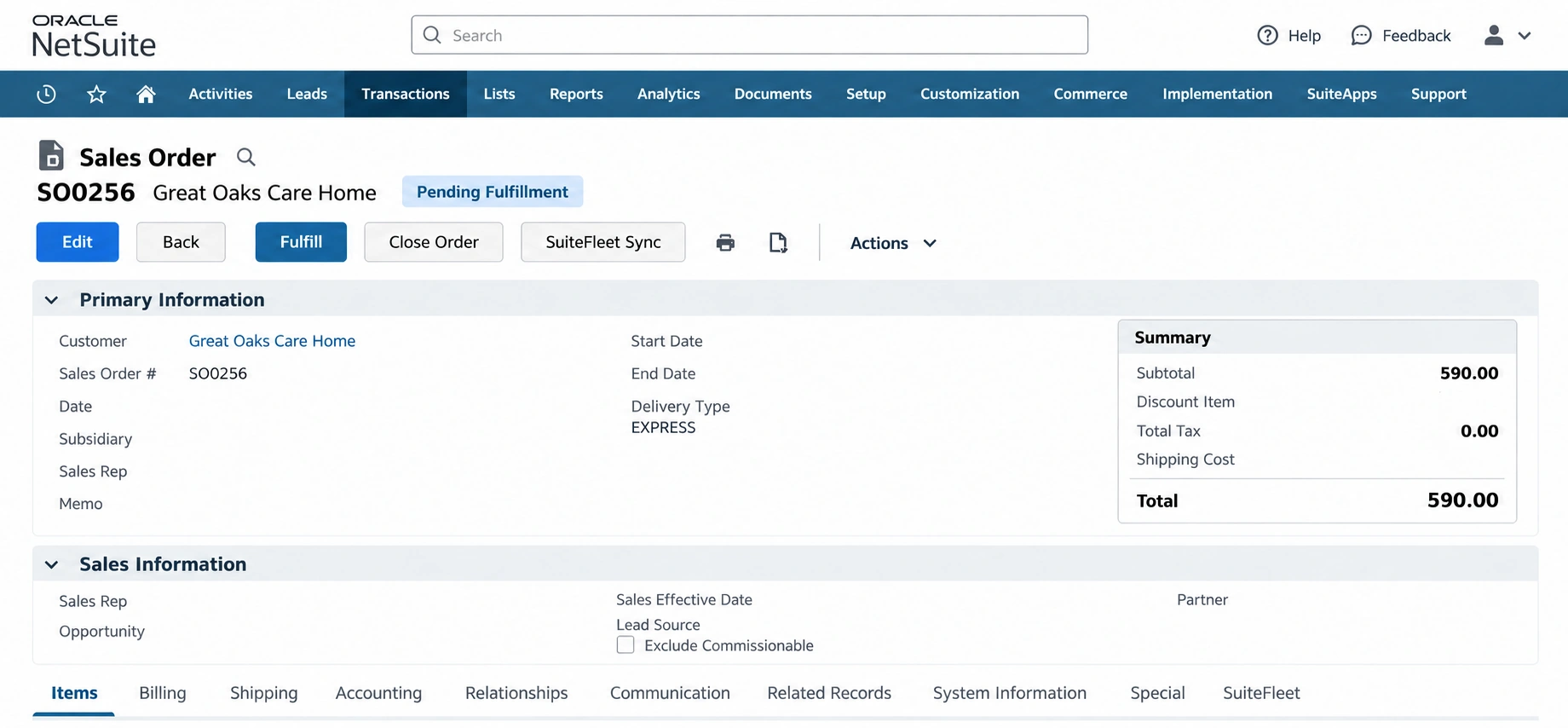
Define proof requirements before release: recipient name, photos, signature, and completion details as supported by your deployed workflow. Specify who reviews missing evidence or disputed receipts. A warehouse shipment confirmation alone does not establish customer handover.
2. Map proof to the correct fulfillment
Link every SuiteFleet task to its NetSuite order and Item Fulfillment using persistent internal identifiers. Keep proof attached to the specific shipment rather than assuming one order has only one delivery.
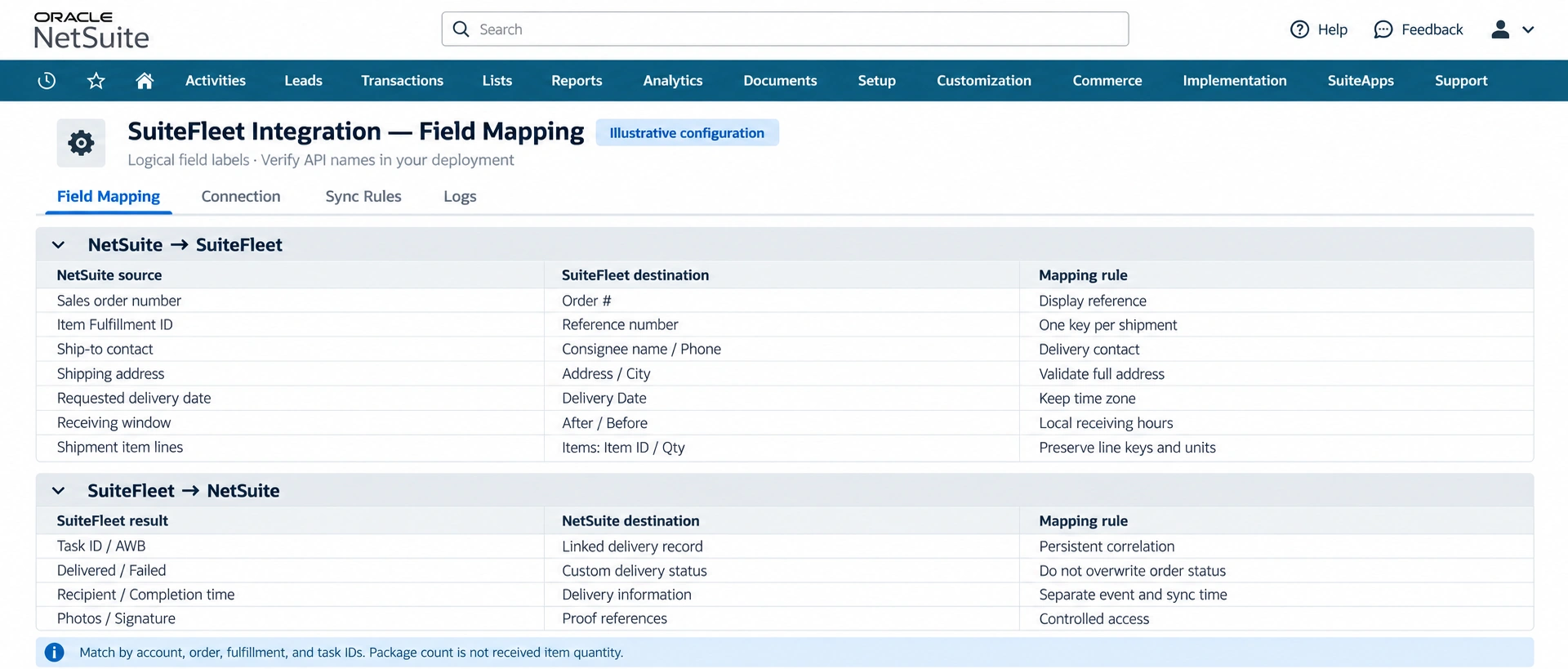
Map the task ID and AWB to the correlation record; map recipient, delivery status, and actual completion time to custom delivery fields; map photos and signatures to controlled evidence references. These are logical destinations, not guaranteed API fields.
| Source → destination | Implementation rule |
|---|---|
| Task ID / AWB → shipment correlation | Resolve the correct fulfillment before storing any evidence. |
| Recipient → delivery information | Preserve the captured recipient separately from the planned consignee. |
| Delivered-at → actual delivery time | Store the time zone or offset; do not replace with sync time. |
| Photos / signature → proof references | Validate retrieval, access, retention, and file-link behavior. |
| Received quantities → line reconciliation | Accept only verified line-level quantities; keep shortages visible. |
Use NetSuite REST authentication and record access appropriate to the deployed connector. For a new custom REST integration, Oracle recommends OAuth 2.0. Confirm file and attachment support independently from basic task sync.
3. Match the task before reviewing proof
Open the SuiteFleet task and compare Order #, Reference number, and AWB with the stored identifiers. Confirm the destination and item details. A matching name or address is not sufficient when a customer receives multiple shipments.
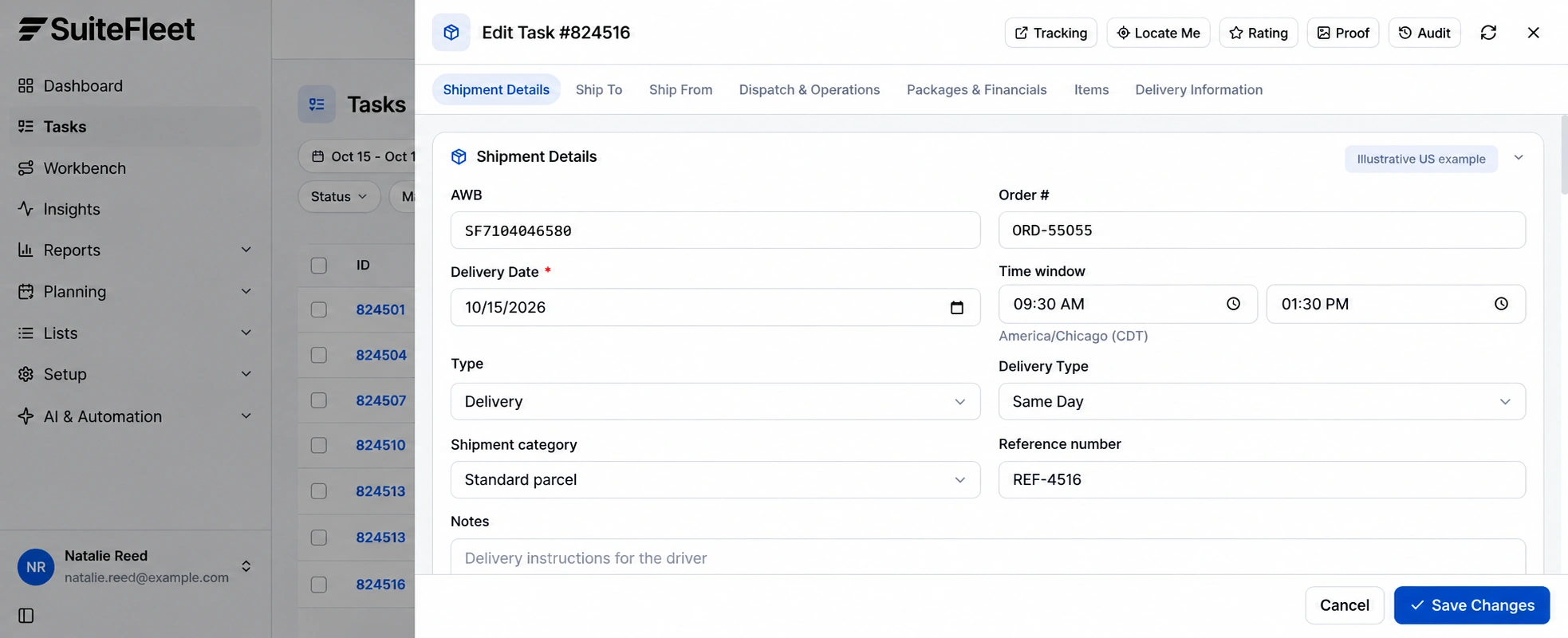
The SuiteFleet example uses task 824516, order ORD-55055, and AWB SF7104046580. Keep these references separate from NetSuite SO0256 when reviewing the workflow.
4. Review the completed handover
Open Proof from the task, or Reports → POD Analysis → Full proof. Inspect the recipient, delivery photographs, signature, and completion information together. The demo separates proof of pickup from proof of delivery; a completed pickup is not a completed delivery.
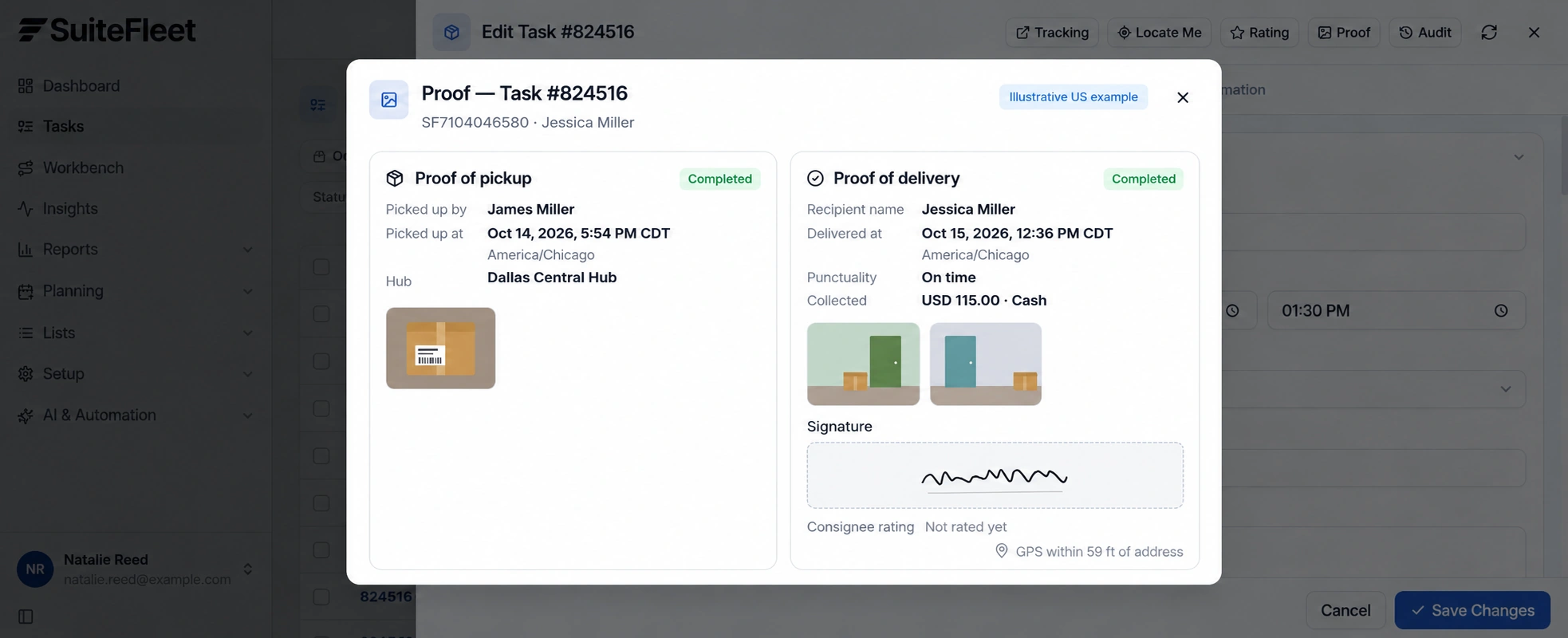
The example records Jessica Miller as the recipient at 12:36 PM CDT on October 15, 2026, using America/Chicago. Reconcile accepted quantities separately against the shipment lines.
Where the operational process requires evidence, route missing or inconsistent proof for review. Use the GPS proximity indication alongside the shipment identity, recipient details, and delivery outcome.
5. Write back evidence and verify the order
After validation, update the linked fulfillment’s delivery fields and store the approved proof references. Deduplicate repeated events and retain a separate successful-sync timestamp. A failed attachment update should remain visible even if the delivery-status update succeeded.
Record shortages, refusals, and other exceptions without treating the entire sales order as received. If the shipment was already posted, do not create another Item Fulfillment. Review the sales order’s fulfilled line quantities alongside the delivery reconciliation.
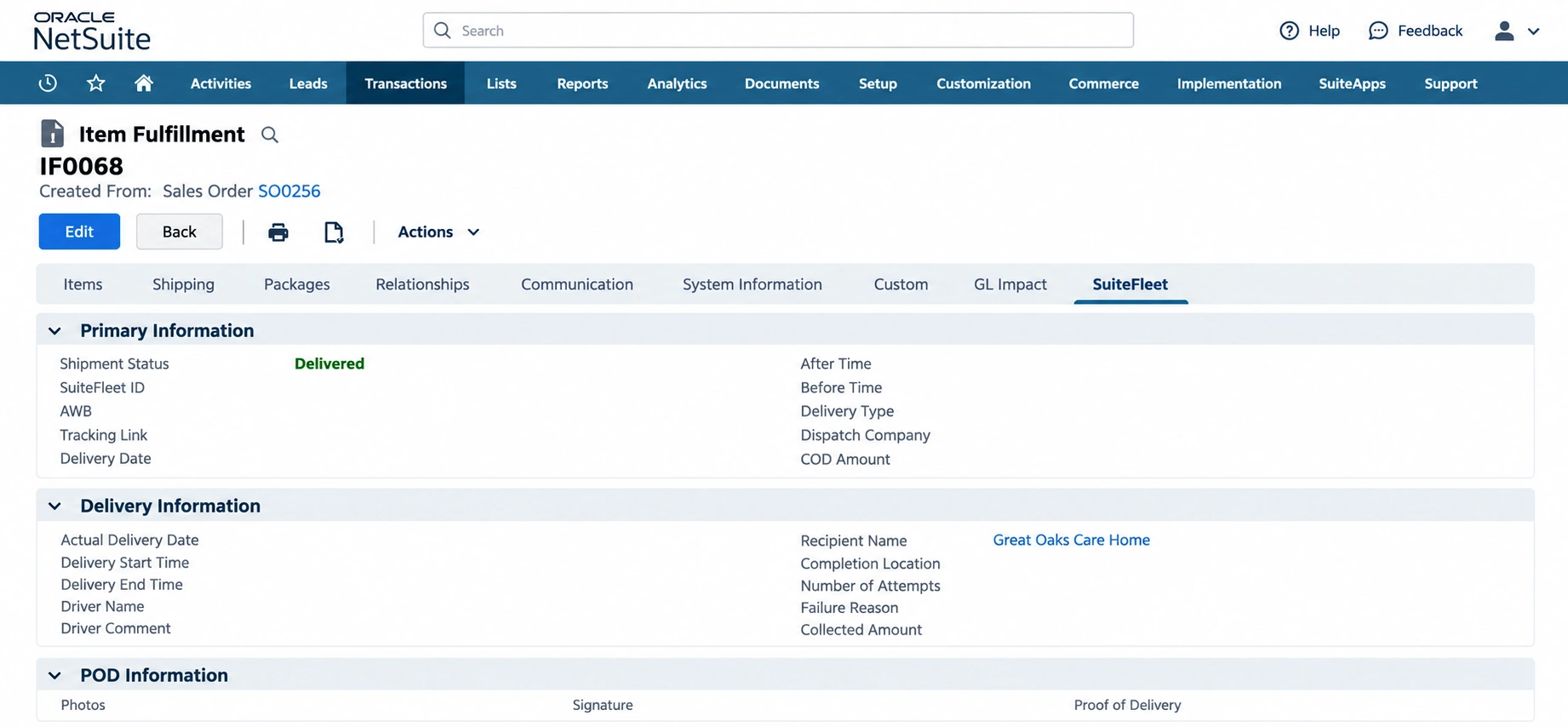
The final illustration shows the delivery writeback destination: the Item Fulfillment’s SuiteFleet tab. It intentionally leaves unverified values blank. Native fulfillment and billing status remain governed by NetSuite’s transaction lifecycle, not by a proof-link update.
Frequently asked questions
How should proof of delivery be matched in NetSuite?
Match proof to the Item Fulfillment and its item lines. Review recipient, actual handover time, evidence references, and accepted quantities independently of the native order status.
Does a delivered task complete the NetSuite source workflow?
Keep shipment, customer receipt, and billing separate. Return delivery evidence to the linked fulfillment’s configured fields; do not create another Item Fulfillment for goods already shipped.


.png)

.jpeg)



.svg)
.png)




.svg)


.svg)
.svg)
.svg)